⸻ Serra Labs Platform · For Cloud Workload Owners ⸻
Workload Resource Optimization — for now and what's next.
Workload Resource Optimization — for now and what's next.
Right configuration, right optimization mode, right cost-performance balance — for every cloud workload, across AWS, Azure, and emerging hyperscalers. Backed by workload trend modeling that anticipates how resource needs will evolve.
How Serra Labs Finds the Optimal Fit
Three optimization paths. One starting point.
AI Prompt-to-Video workload — the Serra Labs Platform searches potentially millions of configurations to find the optimal fit for each strategy.
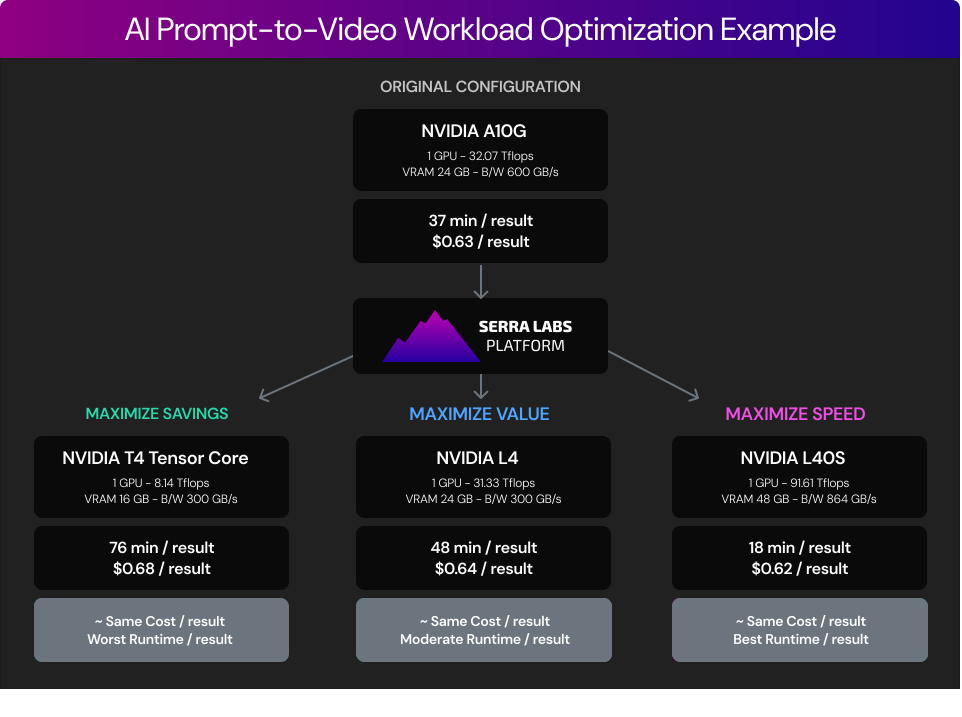
Three Optimization Strategies
Match the right strategy to each workload.
Cut costs where speed doesn’t matter. Unlock speed where it does. Find the right balance in between. The platform handles all three — and adapts as workloads move through their lifecycle.
Strategy 01
💰 Maximize Savings
Lowest cost, acceptable performance. Right-size to eliminate spend that isn't earning its keep
Best For Non-Critical Workloads
Dev / Test
Batch Jobs
Backup & Archive
Background Tasks
Lifecycle note: The right default for most traditional workloads through the lifecycle and for AI workloads in the prototyping phase.
Strategy 02
⚖️ Maximize Value
Best cost-to-production ratio. Invest where performance drives outcomes, stay lean where it doesn't.
Best For Production Workloads
Web Applications
E-Commerce
Production APIs
Lifecycle note: Right for production traditional workloads where performance matters, and for AI workloads in the testing and validation phase.
Strategy 03
⚡️ Maximize Speed
Highest performance, fastest results. When throughput and iteration velocity directly drive business outcomes.
Best For Mission-Critical Workloads
AI Training & Inference
Real-Time Analytics
Latency-Sensitive Services
Lifecycle note: Where AI workloads in production earn their highest return. Also right for traditional workloads in production when performance drives direct business outcomes.
Three Optimization Strategies
Match the right strategy to each workload.
Cut costs where speed doesn’t matter. Unlock speed where it does. Find the right balance in between. The platform handles all three — and adapts as workloads move through their lifecycle.
Strategy 01
💰 Maximize Savings
Lowest cost, acceptable performance. Right-size to eliminate spend that isn't earning its keep
Best For Non-Critical Workloads
Dev / Test
Batch Jobs
Backup & Archive
Background Tasks
Lifecycle note: The right default for most traditional workloads through the lifecycle and for AI workloads in the prototyping phase.
Strategy 02
⚖️ Maximize Value
Best cost-to-production ratio. Invest where performance drives outcomes, stay lean where it doesn't.
Best For Production Workloads
Web Applications
E-Commerce
Production APIs
Lifecycle note: Right for production traditional workloads where performance matters, and for AI workloads in the testing and validation phase.
Strategy 03
⚡️ Maximize Speed
Highest performance, fastest results. When throughput and iteration velocity directly drive business outcomes.
Best For Mission-Critical Workloads
AI Training & Inference
Real-Time Analytics
Latency-Sensitive Services
Lifecycle note: Where AI workloads in production earn their highest return. Also right for traditional workloads in production when performance drives direct business outcomes.
Three Optimization Strategies
Match the right strategy to each workload.
Cut costs where speed doesn’t matter. Unlock speed where it does. Find the right balance in between. The platform handles all three — and adapts as workloads move through their lifecycle.
Strategy 01
💰 Maximize Savings
Lowest cost, acceptable performance. Right-size to eliminate spend that isn't earning its keep
Best For Non-Critical Workloads
Dev / Test
Batch Jobs
Backup & Archive
Background Tasks
Lifecycle note: The right default for most traditional workloads through the lifecycle and for AI workloads in the prototyping phase.
Strategy 02
⚖️ Maximize Value
Best cost-to-production ratio. Invest where performance drives outcomes, stay lean where it doesn't.
Best For Production Workloads
Web Applications
E-Commerce
Production APIs
Lifecycle note: Right for production traditional workloads where performance matters, and for AI workloads in the testing and validation phase.
Strategy 03
⚡️ Maximize Speed
Highest performance, fastest results. When throughput and iteration velocity directly drive business outcomes.
Best For Mission-Critical Workloads
AI Training & Inference
Real-Time Analytics
Latency-Sensitive Services
Lifecycle note: Where AI workloads in production earn their highest return. Also right for traditional workloads in production when performance drives direct business outcomes.
The right optimization strategy depends on two things: what the workload is, and where it is in its lifecycle. Traditional and AI workloads have fundamentally different economics — and lifecycle stage changes the right mode for AI workloads at every transition. Serra Labs is the platform that handles both, automatically, across every workload in your environment.
The right optimization strategy depends on two things: what the workload is, and where it is in its lifecycle. Traditional and AI workloads have fundamentally different economics — and lifecycle stage changes the right mode for AI workloads at every transition. Serra Labs is the platform that handles both, automatically, across every workload in your environment.
The right optimization strategy depends on two things: what the workload is, and where it is in its lifecycle. Traditional and AI workloads have fundamentally different economics — and lifecycle stage changes the right mode for AI workloads at every transition. Serra Labs is the platform that handles both, automatically, across every workload in your environment.
How It Works
From workload data to optimal configuration
Six steps from raw telemetry to a validated recommendation — with workload type and lifecycle stage as first-class inputs at every stage.
Step 01
📡 Collect
Workload utilization, resource health, and performance metrics — including CPU steal cycles, disk I/O wait, memory pressure, and GPU core saturation. Health alongside utilization, not utilization alone.
Step 02
🔍 Classify
Workload type — AI/GPU or traditional/CPU — and lifecycle stage: prototyping, testing and validation, or production. Both dimensions determine the right optimization strategy.
Step 03
🎯 Select Mode
The right optimization mode for this workload at this stage: Maximize Savings, Maximize Value, or Maximize Speed. Not one mode for everything — the right mode for each.
Step 04
⚡️ Search
A patent-pending approach efficiently searches potentially millions of configurations — GPU cores, VRAM, CPU, memory, network, and storage — to find the optimal fit for the objective.
Step 05
✅ Validate
Expected cost and performance outcomes — with a guaranteed performance floor. Cost optimization means the lowest cost configuration that still delivers defined performance, not cost-cutting.
Step 06
🔄 Apply & Observe
Deploy the recommendation and continuously monitor cost-performance efficiency. As workloads mature through their lifecycle, the platform adjusts the optimization mode accordingly.
How It Works
From workload data to optimal configuration
Six steps from raw telemetry to a validated recommendation — with workload type and lifecycle stage as first-class inputs at every stage.
Step 01
📡 Collect
Workload utilization, resource health, and performance metrics — including CPU steal cycles, disk I/O wait, memory pressure, and GPU core saturation. Health alongside utilization, not utilization alone.
Step 02
🔍 Classify
Workload type — AI/GPU or traditional/CPU — and lifecycle stage: prototyping, testing and validation, or production. Both dimensions determine the right optimization strategy.
Step 03
🎯 Select Mode
The right optimization mode for this workload at this stage: Maximize Savings, Maximize Value, or Maximize Speed. Not one mode for everything — the right mode for each.
Step 04
⚡️ Search
A patent-pending approach efficiently searches potentially millions of configurations — GPU cores, VRAM, CPU, memory, network, and storage — to find the optimal fit for the objective.
Step 05
✅ Validate
Expected cost and performance outcomes — with a guaranteed performance floor. Cost optimization means the lowest cost configuration that still delivers defined performance, not cost-cutting.
Step 06
🔄 Apply & Observe
Deploy the recommendation and continuously monitor cost-performance efficiency. As workloads mature through their lifecycle, the platform adjusts the optimization mode accordingly.
How It Works
From workload data to optimal configuration
Six steps from raw telemetry to a validated recommendation — with workload type and lifecycle stage as first-class inputs at every stage.
Step 01
📡 Collect
Workload utilization, resource health, and performance metrics — including CPU steal cycles, disk I/O wait, memory pressure, and GPU core saturation. Health alongside utilization, not utilization alone.
Step 02
🔍 Classify
Workload type — AI/GPU or traditional/CPU — and lifecycle stage: prototyping, testing and validation, or production. Both dimensions determine the right optimization strategy.
Step 03
🎯 Select Mode
The right optimization mode for this workload at this stage: Maximize Savings, Maximize Value, or Maximize Speed. Not one mode for everything — the right mode for each.
Step 04
⚡️ Search
A patent-pending approach efficiently searches potentially millions of configurations — GPU cores, VRAM, CPU, memory, network, and storage — to find the optimal fit for the objective.
Step 05
✅ Validate
Expected cost and performance outcomes — with a guaranteed performance floor. Cost optimization means the lowest cost configuration that still delivers defined performance, not cost-cutting.
Step 06
🔄 Apply & Observe
Deploy the recommendation and continuously monitor cost-performance efficiency. As workloads mature through their lifecycle, the platform adjusts the optimization mode accordingly.
Key Capabilities
Everything needed to make cloud spend smart
Most cloud optimization tools snapshot the current configuration and recommend a static fix. Serra Labs measures workload behavior continuously and models how resource needs are trending — so optimization stays current as workloads evolve, and infrastructure planning anticipates what’s coming rather than reacting to it.
🖥️ Workload-Aware Optimization
Different strategies for AI and traditional workloads, matching the right mode to each workload's type and lifecycle stage. Not one strategy applied uniformly — the right one for each situation.
⚡️ GPU-Aware Configuration
For AI workloads: evaluates GPU cores, VRAM, and memory bandwidth together — not just core count or hourly rate. A cheaper GPU that stalls on VRAM constraints or memory bandwidth is not a cheaper GPU per result.
📐 Performance-Guaranteed Right-Sizing
For traditional workloads: finds the lowest cost configuration that still delivers a defined performance floor. Cost optimization, not cost-cutting — the performance constraint is hard, not a preference.
🩺 Resource Health Analysis
Evaluates health signals alongside utilization — CPU steal cycles, disk I/O wait, memory pressure, network retransmits. Prevents false economies where a lower bill means degraded performance that doesn't show up on an invoice.
🔄 Lifecycle Mode Management
Applies cost optimization in prototyping, value optimization in validation, and performance optimization in production — for AI workloads where lifecycle is a first-class input. Consistent cost discipline with performance awareness throughout for traditional workloads.
🧹 Optimal Parking & Cleanup
Identifies resources with periodic use patterns for auto-shutdown when idle and auto-start when needed. Automatically eliminates wasteful resources on a continuous basis — spend that isn't earning its keep, removed.
Key Capabilities
Everything needed to make cloud spend smart
Most cloud optimization tools snapshot the current configuration and recommend a static fix. Serra Labs measures workload behavior continuously and models how resource needs are trending — so optimization stays current as workloads evolve, and infrastructure planning anticipates what’s coming rather than reacting to it.
🖥️ Workload-Aware Optimization
Different strategies for AI and traditional workloads, matching the right mode to each workload's type and lifecycle stage. Not one strategy applied uniformly — the right one for each situation.
⚡️ GPU-Aware Configuration
For AI workloads: evaluates GPU cores, VRAM, and memory bandwidth together — not just core count or hourly rate. A cheaper GPU that stalls on VRAM constraints or memory bandwidth is not a cheaper GPU per result.
📐 Performance-Guaranteed Right-Sizing
For traditional workloads: finds the lowest cost configuration that still delivers a defined performance floor. Cost optimization, not cost-cutting — the performance constraint is hard, not a preference.
🩺 Resource Health Analysis
Evaluates health signals alongside utilization — CPU steal cycles, disk I/O wait, memory pressure, network retransmits. Prevents false economies where a lower bill means degraded performance that doesn't show up on an invoice.
🔄 Lifecycle Mode Management
Applies cost optimization in prototyping, value optimization in validation, and performance optimization in production — for AI workloads where lifecycle is a first-class input. Consistent cost discipline with performance awareness throughout for traditional workloads.
🧹 Optimal Parking & Cleanup
Identifies resources with periodic use patterns for auto-shutdown when idle and auto-start when needed. Automatically eliminates wasteful resources on a continuous basis — spend that isn't earning its keep, removed.
Key Capabilities
Everything needed to make cloud spend smart
Most cloud optimization tools snapshot the current configuration and recommend a static fix. Serra Labs measures workload behavior continuously and models how resource needs are trending — so optimization stays current as workloads evolve, and infrastructure planning anticipates what’s coming rather than reacting to it.
🖥️ Workload-Aware Optimization
Different strategies for AI and traditional workloads, matching the right mode to each workload's type and lifecycle stage. Not one strategy applied uniformly — the right one for each situation.
⚡️ GPU-Aware Configuration
For AI workloads: evaluates GPU cores, VRAM, and memory bandwidth together — not just core count or hourly rate. A cheaper GPU that stalls on VRAM constraints or memory bandwidth is not a cheaper GPU per result.
📐 Performance-Guaranteed Right-Sizing
For traditional workloads: finds the lowest cost configuration that still delivers a defined performance floor. Cost optimization, not cost-cutting — the performance constraint is hard, not a preference.
🩺 Resource Health Analysis
Evaluates health signals alongside utilization — CPU steal cycles, disk I/O wait, memory pressure, network retransmits. Prevents false economies where a lower bill means degraded performance that doesn't show up on an invoice.
🔄 Lifecycle Mode Management
Applies cost optimization in prototyping, value optimization in validation, and performance optimization in production — for AI workloads where lifecycle is a first-class input. Consistent cost discipline with performance awareness throughout for traditional workloads.
🧹 Optimal Parking & Cleanup
Identifies resources with periodic use patterns for auto-shutdown when idle and auto-start when needed. Automatically eliminates wasteful resources on a continuous basis — spend that isn't earning its keep, removed.
How Serra Labs Finds the Optimal Fit
Serra Labs finds what's actually best.
A patent-pending approach efficiently searches potentially millions of possible configurations — GPU cores, VRAM, CPU, memory, network, and storage — to find the optimal fit for the workload type and where it is in its lifecycle.
How Serra Labs Finds the Optimal Fit
Serra Labs finds what's actually best.
A patent-pending approach efficiently searches potentially millions of possible configurations — GPU cores, VRAM, CPU, memory, network, and storage — to find the optimal fit for the workload type and where it is in its lifecycle.
How Serra Labs Finds the Optimal Fit
Serra Labs finds what's actually best.
A patent-pending approach efficiently searches potentially millions of possible configurations — GPU cores, VRAM, CPU, memory, network, and storage — to find the optimal fit for the workload type and where it is in its lifecycle.
Integrations
Works with your infrastructure

Amazon Web Services

Microsoft Azure
NVIDIA
Integrations
Works with your infrastructure
Amazon Web Services
Microsoft Azure
NVIDIA
Integrations
Works with your infrastructure
Amazon Web Services
Microsoft Azure
NVIDIA
Also Available · Solution 02
Building or operating an AI data center?
The same workload-on-hardware measurement and trend modeling that powers workload optimization also drives capacity planning, inventory pricing, and customer placement for AI cloud providers and colocation operators building AI capacity. One platform, two solutions.
Start optimizing every workload for what it actually needs.
Try the Serra Labs Platform free - no commitment required.
Start optimizing every workload for what it actually needs.
Try the Serra Labs Platform free - no commitment required.
Start optimizing every workload for what it actually needs.
Try the Serra Labs Platform free - no commitment required.